Blog

  • Jailbreak iOS 11 – 11.3.1 ( 11.4.1 Beta 3)

    The most advanced Jailbreak tool – iOS 11 to iOS 12

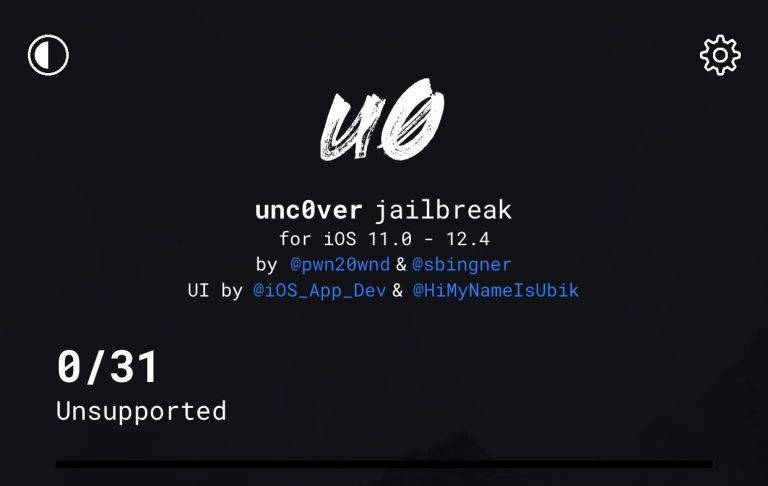
    Unc0ver jailbreak is fully compatible with all iOS devices on iOS 11 or higher versions. It was developed by Sam Binger and pwn20wnd.In this tutorial, we will provide step-by-step instructions to jailbreak iOS 11 – iOS 11.3.1 (iOS 11.4 beta 3) using Unc0ver Jailbreak on your iPhone, iPad, or iPod touch.

    Unc0ver is a semi-untethered jailbreak tool that will need to be run every time you reboot your iPhone or iPad.


    Online Install


    Download unc0ver IPA


    ⚠️Your donations are great to help for our Jailbreak Developers⚠️

    Revoked, You can support us to get a new certificate via PayPal:


    Great news for the jailbreak community, The new version of the uncover jailbreak released with the support for all the iOS versions from iOS 11 to iOS 12.4.8, A7 – A12 devices, and iOS 13. to iOS 14.3 A12 – A13.

    Download Unc0ver jailbreak iOS 13.3 jailbreak – (v 4.3.1)


    Download unc0ver jailbreak iOS 13.3 IPA File


    Unc0ver iOS 13.3 Online Install

    Unc0ver jailbreak iOS 13 – AltStore​

    AltStore is a third-party app installer for iOS. AltStore for iOS brings to you a completely different kind of app store using which you can install third-party apps without getting revoked.


    More about AltStore>>>

    Let’s dive in:

    Device Compatibility :

    • iPhone XS
    • iPhone XS Max
    • iPhone XR
    • iPad Pro (2018)
    • iPhone X
    • iPhone 8 Plus
    • iPhone 8
    • iPhone 7 Plus
    • iPhone 7
    • iPhone 6s Plus
    • iPhone 6s
    • iPhone 6 Plus
    • iPhone 6
    • iPhone SE
    • iPhone 5s

    Supported iOS 11 Versions:

    The following iOS 11 versions support the download of Cydia :

    • iOS 11
    • iOS 11.1
    • iOS 11.2
    • iOS 11.3
    • iOS 11.3.1
    • iOS 11.4
    • iOS 11.4.1

    Download Unc0ver Jailbreak

    You can download the latest version of Unc0ver jailbreak from Github hosted by pwn20wnd.

    Before you try to jailbreak your iPhone or iPad using Unc0ver, it is extremely important that you ensure no iOS 12 OTA file has been downloaded and saved on your device.

    Make sure to delete it from Settings -> Storage and only then proceed to jailbreak your iPhone/iPad.

    If an OTA file is present, your device will end up in a respring or reboot loop.

    UO4S store

    The new U4OS App Store (u04) provides the ability to install unc0ver Jailbreak applications without a computer. (revoke fixed for uncover jailbreak )

    UOS store is one of the best jailbreak solutions for iOS 11, iOS 11.1, iOS 11.2, iOS 11.2.2, iOS 11.4, iOS 11.4.1 and  It has 1000+ Jailbreak Tweaks, Cydia-apps, Hacked Games, and more…


    UO4S store

    Install uncover without computer

    You can complete unc0ver jailbreak without a PC. It is available with zeejb Online JB app.

    Get an online jailbreak guide from here.


    Install Latest unc0ver Jailbreak

    Lorem ipsum dolor sit amet, consectetur adipiscing elit. Ut elit tellus, luctus nec ullamcorper mattis, pulvinar dapibus leo.

    Prerequisites

    • Download unc0ver IPA from here.


    Download unc0ver IPA

    • Download Cydia impactor from the official site or any other related site.


    Download Cydia impactor

    • Enable Airplane Mode before start the jailbreak.
    • Disable your passcode, Touch ID, Face ID & Siri before start the jailbreak.
    • Reboot your device after doing the above steps.

    Before you start, back up the data on your device using iTunes and ensure that you have sufficient battery to complete the jailbreak.

    Step Guide

    Step 01 – Connect your iPhone, iPad, or iPod to your computer and open Cydia Impactor.

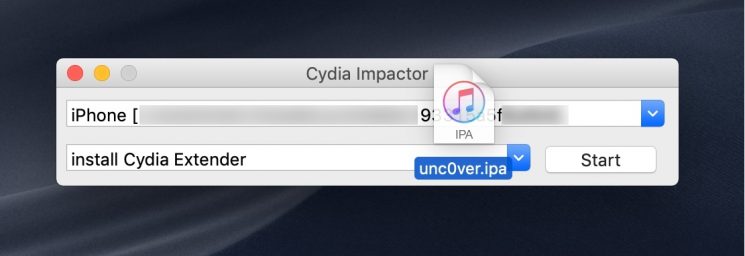
    Step 02 – Once it detects your device, drag the unc0ver.IPA file onto the Cydia Impactor window.
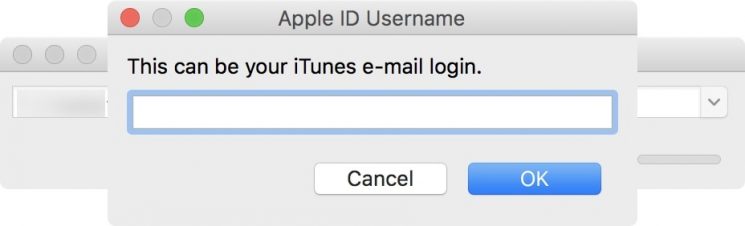
    Step 03 – You need to provide your Apple credentials to sideload the Jailbreak app. Sign in with your Apple ID when prompted
    Once installed, it should have the Unc0ver Jailbreak app on your device homescreen.

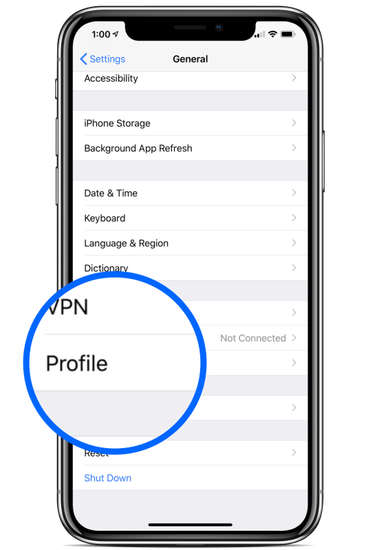
    Step 04 – Once the process has finished, open your iOS Settings and go to General > Profiles
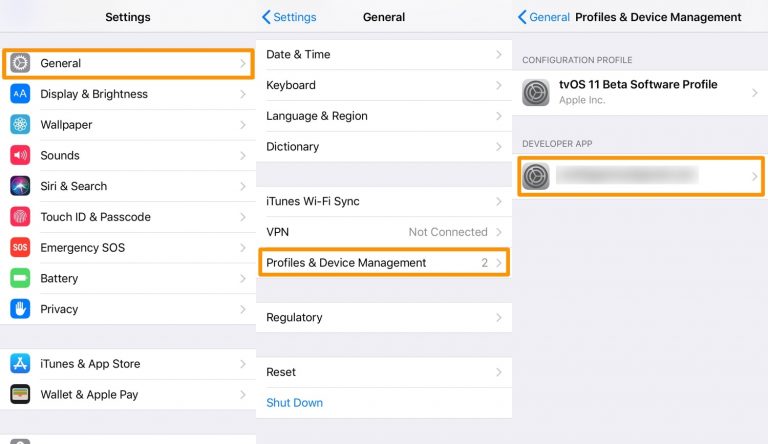
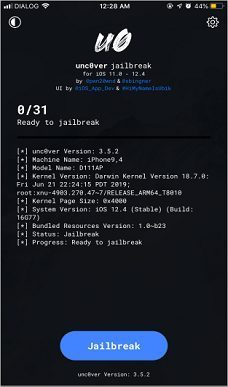
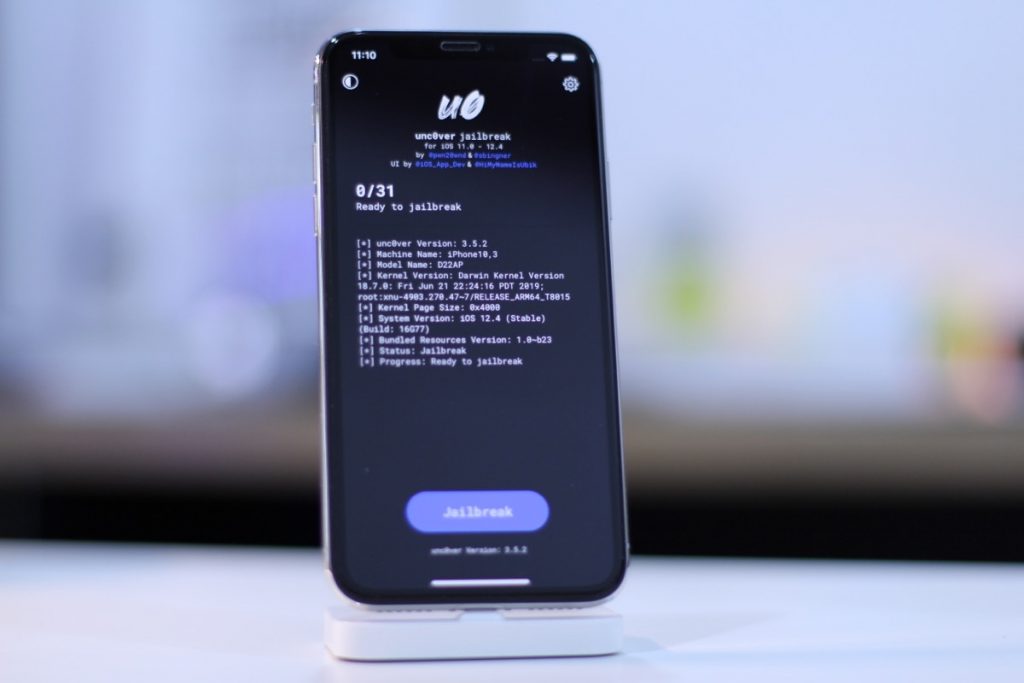
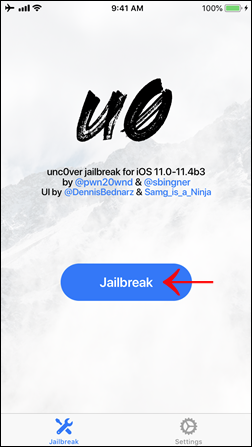
    Step 05 – Now run the unc0ver app from your device and tap on the blue Jailbreak button to start the jailbreak process.
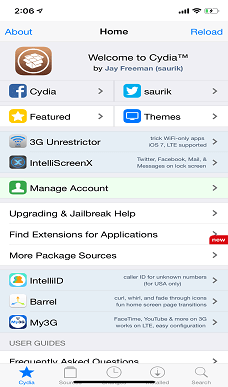
    Once finished, you’ll find Cydia on your Home screen, like so
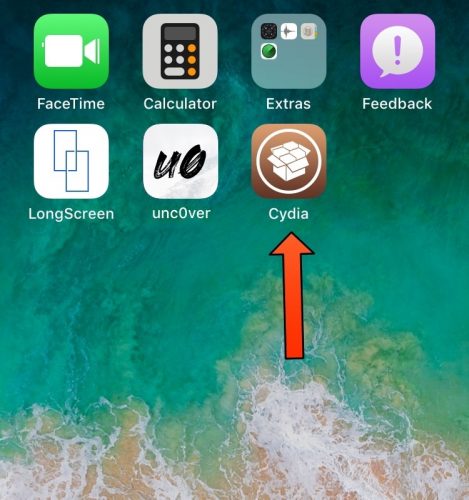
    Note: If you don’t see Cydia after jailbreaking with unc0ver, then reboot and re-launch the unc0ver jailbreak app and keep trying until it works.

    Share on Facebook
    Facebook
    Share on google
    Google+
    Share on Twitter
    Twitter
    Share on Linkedin
    LinkedIn

    Other Jailbreak Solutions

    Here we have listed all iOS 11 – iOS 11.4.1 Other Jailbreak Solutions.

    1. PikZo
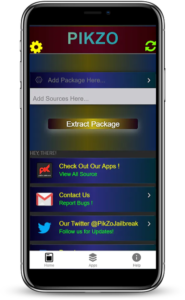
    Pikzo repo extractor for iOS 11 to iOS 13.3 Pikzo was released by famous jailbreak developer @Danielgroves, He will impliment this as a alternative jailbreak solution for iOS 11 in 2017,

    PikZo is the Jailbreak Repo Extractor for iOS 11 – iOS 13.3 and higher versions.PikZo installs Cydia (Moded Version) and popular jailbreak apps including Repos / Themes.

    There are many apps, tweaks, themes, settings, and many more things on Pikzo. Also, PikZo is a Repo extractor. It contains modifications & tweaks and more..that can be used to modify or change some part of the iOS.
    Download PikZo


    ⚠️Your donations are great to help for our Jailbreak Developers⚠️

    Revoked, You can support us to get a new certificate via PayPal:


    Thanks for UncOver Developer and team – https://twitter.com/pwn20wnd

  • iOS 12.4 Jailbreak

    In this tutorial, we cover how to jailbreak iOS 12.4 -12.4.1 using the latest unc0ver Jailbreak with Computer Cydia Impact Method or Online Method. unc0ver v3.7.0~b1 is NOW OUT with full-fledged A12-A12X support with Cydia and system-wide tweak injection!

    iOS 12.4 jailbreak uncover updates

    The iOS 12.4 Jailbreak is now available for A7-A11 devices.

    Now can now jailbreak iOS 12.1.3, iOS 12.1.4, iOS 12.2, and iOS 12.4 using Unc0ver jb.

    How to Jailbreak iOS 12.4 on iPhone or iPad.

    Uncover-team has just dropped the Unc0ver 3.7.0 update which adds support for jailbreaking iOS 12.4 — the very latest public release of iOS from Apple.This iOS 12.4 unc0ver jailbreaks is supported for A7 – A12 devices, for now, that is iPhone X, iPhone XS Max, and iPhone XR.

    The New unc0ver jailbreak- iOS 13.3 released.

    Great news for the jailbreak community, The new version of the uncover jailbreak released with the support for all the iOS versions from iOS 11 to iOS 12.4, A7 – A12 devices

    Latest version 6.1.2 is now support for iOS 11 to iOS 14.3.

    More about Unc0ver jailbreak iOS 13.3.>>>

    UO4S store

    The new UO4S App Store (u04) provides the ability to install unc0ver Jailbreak applications without a computer. (revoke fixed for uncover jailbreak ).UO4S store is one of the best jailbreak solutions for iOS 12, iOS 12.4, iOS 13, iOS 13.1, iOS 13.2, iOS 13.3 to higher version. It has 1000+ Jailbreak Tweaks, Cydia-apps, Hacked Games, and more…

    Install UO4S store

    Device Compatibility :

    • iPhone 5s
    • iPhone 6
    • iPhone 6 Plus
    • iPhone 6s
    • iPhone 6s Plus
    • iPhone 7
    • iPhone 7 Plus
    • iPhone SE
    • iPhone 8
    • iPhone 8 Plus
    • iPhone X
    • iPhone XS, iPhone XS Max, iPhone XR, 2018 iPad Pro
    • iPad Air
    • 6th gen iPad

    This jailbreak tool only supports to jailbreak iOS 12.4 and iOS 12 – iOS 12.2 versions at the moment. Also, you can use the uncover jailbreak IPA to perform the iOS 12.4 jailbreak using a PC.

    Follow these Steps to Successful Jailbreak

    Prerequisites

    • Enable Airplane Mode.
    • Disable Siri / Disable Touch ID
    • Delete any iOS 12 OTA update file from Settings -> Storage and reboot your device before attempting to jailbreak it.
    • Close all open applications or games from the app switcher.
    • Restart your device and then Launch the jailbreak app.

    Install Unc0ver iOS 12.4 Jailbreak Online Guide

    Step 1:

    First, you need to install unc0ver into your iPhone / iPad using the ignitionZeejb or you can also use Tweakbox to install it.Install Online

    Step 2:

    iOS 12.4 jailbreak uncover online tool

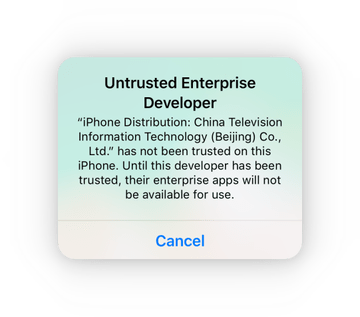
    After successful installation, When you try to open it, probably you’ll see a notification of “Untrusted Enterprise Developer”

    Step 3:

    Then go to Settings → General → Profiles & Device Management and tap your Apple ID.

    Tap on trust and then again on trust in the popup window. After this, you can open unc0ver without any restriction.

    After Open the application then goes to the settings below.

    For example, disable auto-updates and disable app revoke. You should keep Kernel Exploit to EL in most cases. But you can switch to MP if your device supports multi-path.

    Unc0ver iOS 12.4 Jailbreak with computer Guide

    GitHub link to download IPA file for Unc0ver. Make sure you download the latest IPA file, as it is more stable and than previous ones.

    Step 01 – Download Uncover IPA & Cydia Impactor using the following links.

    Unc0ver iPA Cydia Impactor

    Step 02 – Connect your device with computer and Launch Cydia impactor from the computer.

    Step 03 – It will detect your device and then drag the Uncover IPA on to Cydia Impactor.

    Step 04 – Enter your Apple ID & Password when prompted. It will sideload the Uncover app to your device.

    Step 05 – After, few seconds, Uncover app appeared on your device and trust the app before running it. Go to Settings → General → Profiles & Device Management → Trust the app.

    Step 06 – Now run the Uncover Jailbreak app from your device and Tap the Jailbreak button to begin the jailbreak process.

    ios 13.5 uncover jailbreak online installation

    Step 07 – Wait until jailbreak complete and finally you can see the Cydia on your device homescreen.

    cydia installation unc0ver tool

    Thanks for UncOver Developer and team – https://twitter.com/pwn20wnd

    Unc0ver jailbreak iOS 12,12.4-13 Updates

    v4.3.1 Release

    Last updated at 03/08/2020

    03/08/2020 – v4.3.1 was released for production with the following changes:

    Make the following changes for the substitute code substitutor:

    • Bumped version to 4.3.1 due to a Github bug causing an older file to be temporarily available
    • Add support for rebooting the userspace for the first time in a jailbreak
    • Add support for injecting to the entire userspace
    • Add support for looking up or registering services from the sandbox with the cy: prefix for developers
    • Reboot the userspace after jailbreaking
    • Make major design changes to preserve stock system performance
    • Fix random reboots, freezes, memory issues and any known problem that affected system services or apps
    • Fix persistent software update blocker on iOS 13 (Works in the jailed state too)
    • Fix a design problem that affected the Succession restore tool
    • Automatically re-enable software updates when restoring RootFS.

    Undecimus-v4.3.1.ipa iOS 13.3 Unc0ver jailberak UO4s

  • Uncover jailbreak Features:

    Uncover is a semi-untethered jailbreak that will need to be run every time you reboot your iPhone or iPad. Uncover jailbreak offers plenty of great features.

    The Unc0ver jailbreak has been developed by the @pwn20wnd team. It supports almost all iPhones and iPads in the market running iOS 12 – iOS 12.2, and A7-A11 devices on iOS 12.4 – iOS 12.3. Below is everything you need to know about it.
    Uncover jailbreak
    • Reliable and stable
    • Safe to install
    • User-friendly
    • Fast patches
    • Doesn’t drain your battery
    • Doesn’t freeze up randomly
    • Built-in block for certificate revokes
    • Disable auto-update option
    • No viruses or malware
    • Remount RootFS
    • Plenty more features

    UO4S store

    The new UO4S App Store (u04) provides the ability to install unc0ver Jailbreak applications without a computer. (revoke fixed for uncover jailbreak )

    UO4S store is one of the best jailbreak solutions for iOS 11 – ios 11.4.1, iOS 12, iOS 12.4, iOS 13, iOS 13.1, iOS 13.2, iOS 13.3, iOS 13.4, iOS 13.5  It has 1000+ Jailbreak Tweaks, Cydia-apps, Hacked Games and more…

    latest updates

    v4.3.1 Release

    Last updated at 03/08/2020

    03/08/2020 – v4.3.1 was released for production with the following changes:

    Make the following changes for the substitute code substitutor:

    • Bumped version to 4.3.1 due to a GitHub bug causing an older file to be temporarily available
    • Add support for rebooting the userspace for the first time in a jailbreak
    • Add support for injecting to the entire userspace
    • Add support for looking up or registering services from the sandbox with the cy: prefix for developers.
    • Reboot the userspace after jailbreaking
    • Make major design changes to preserve stock system performance
    • Fix random reboots, freezes, memory issues and any known problem that affected system services or apps
    • Fix persistent software update blocker on iOS 13 (Works in the jailed state too)
    • Fix a design problem that affected the Succession restore tool
    • Automatically re-enable software updates when restoring RootFS

    v4.0.3 Release

    Last updated at: 02/19/2020

    02/19/2020 – v4.0.0 was released for production with the following changes:

    • Fully fix App Store on A12-A13
    • Fix a bug that affected system services on A12-A13
    • Improve the exploit reliability by guiding the user on the proper use

    v3.7.0 Release

    • Last updated at 09/22/2019

    09/22/2019 – v3.7.0~b1 was released for public beta testing with the following changes:

    • Full-fledged A12-A12X support with Cydia and system-wide tweak injection

    v3.6.2 Release

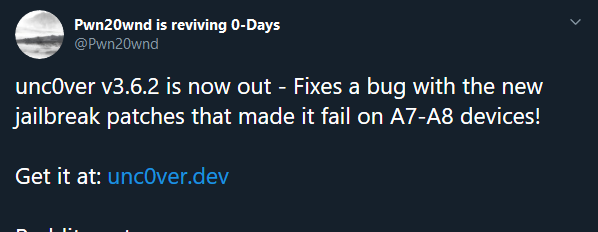
    Unc0ver is a semi-tethered jailbreak, which is similar to an untethered jailbreak, it gives the ability to reboot your iOS device on its own. On each boot, the iOS device startup sequence is unmodified and it boots into its original, non-jailbroken state.
    uncover

    v3.6.0 Release

     The Unc0ver jailbreak has been developed by the @pwn20wnd team. It supports almost all iPhones and iPads in the market running iOS 12 – iOS 12.2, and A7-A11 devices on iOS 12.4 – iOS 12.3. Below is everything you need to know about it.
    uncover

    Thanks for UncOver Developer and team – https://twitter.com/pwn20wnd